
Apple Update
The Apple Update profile allows you to configure update settings for iOS and macOS. It enables you to define, among other things, the installation schedule, update delays, and rules for downloading them. For the profile to function properly, declarative management must be enabled on the device.
Compatibility:
- iOS (from iOS 17)
- macOS (from macOS 14)
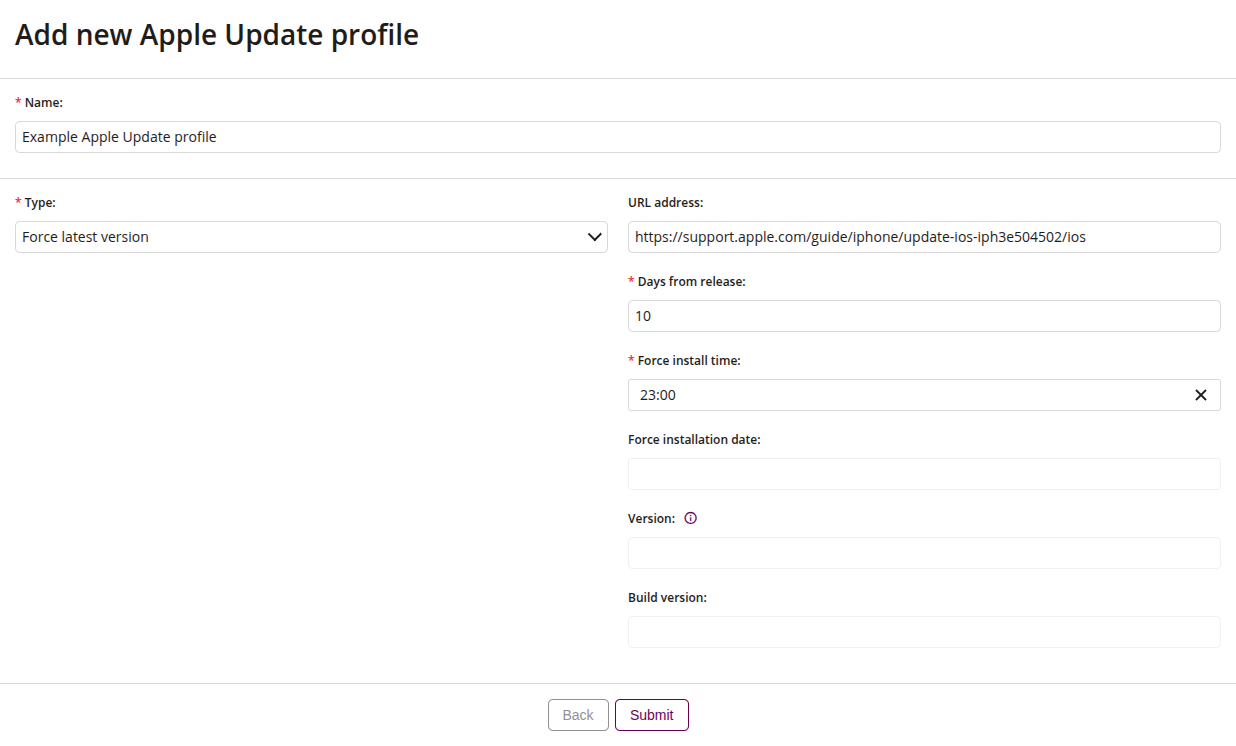
1 Name
- Name of the Apple Business Manager profile
- Maximum length of the text is 255
- Required
2 Type
- Select the device update type, such as:
- Force latest version
- The device will be updated to the latest available software version, regardless of the currently installed one
- Specific version
- Allows specifying the exact software version to which the device should be updated
- Force latest version
3 URL address
- Provide a URL to a web page with additional information for users about the forced software update
4 Days from release
- Specify the number of days after the update is released that the installation will be automatically enforced on the device
- Available if selected Force latest version
- Required
5 Force install time
- Set the local time at which the software update installation will be enforced
- Available if selected Force latest version
- Required
6 Force installation date
- Set the local date when the software update installation should be enforced (RFC3339 format, without time zone offset)
- Available if selected Specific version
- Required
7 Version
- Select the target operating system version to which the device should be updated
- Available if selected Specific version
- Required
8 Build version
- Enter the target system build version that should be installed on the device
- Available if selected Specific version