Selected group.
Selected group Here you can find general information about selected group and make changes to an existing group.
Links on this page: Edit group filter.
Selected group
Updated:
Here you can find general information about selected group and make changes to an existing group.
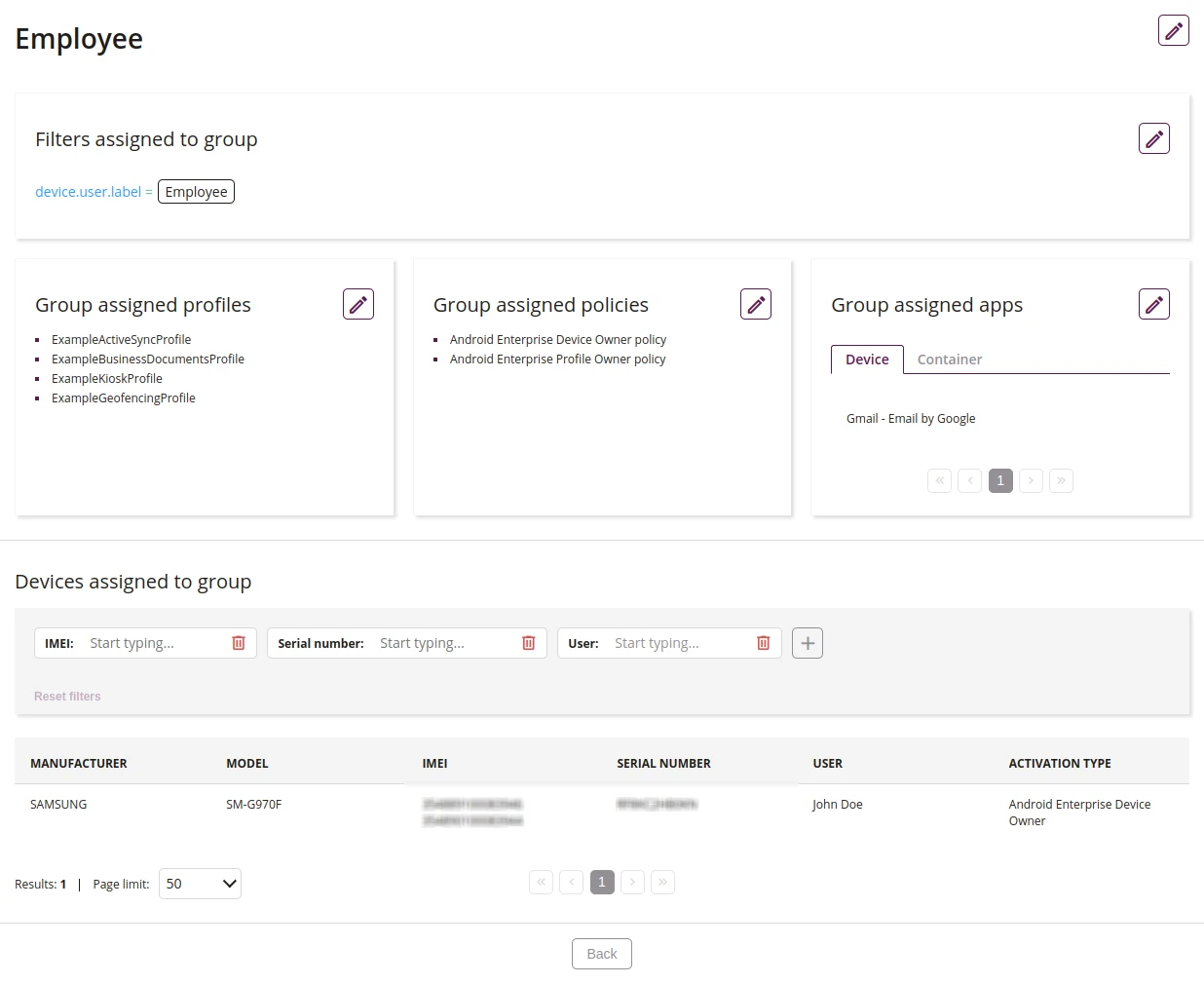
1 Edit group name
- This action allows you to edit the group name
- This action allows you to edit the group filter
3 Edit the group profiles
- This action allows you to edit the profiles in the group
4 Edit the group policies
- This action allows you to edit the policies in the group
5 Update applications assigned by group
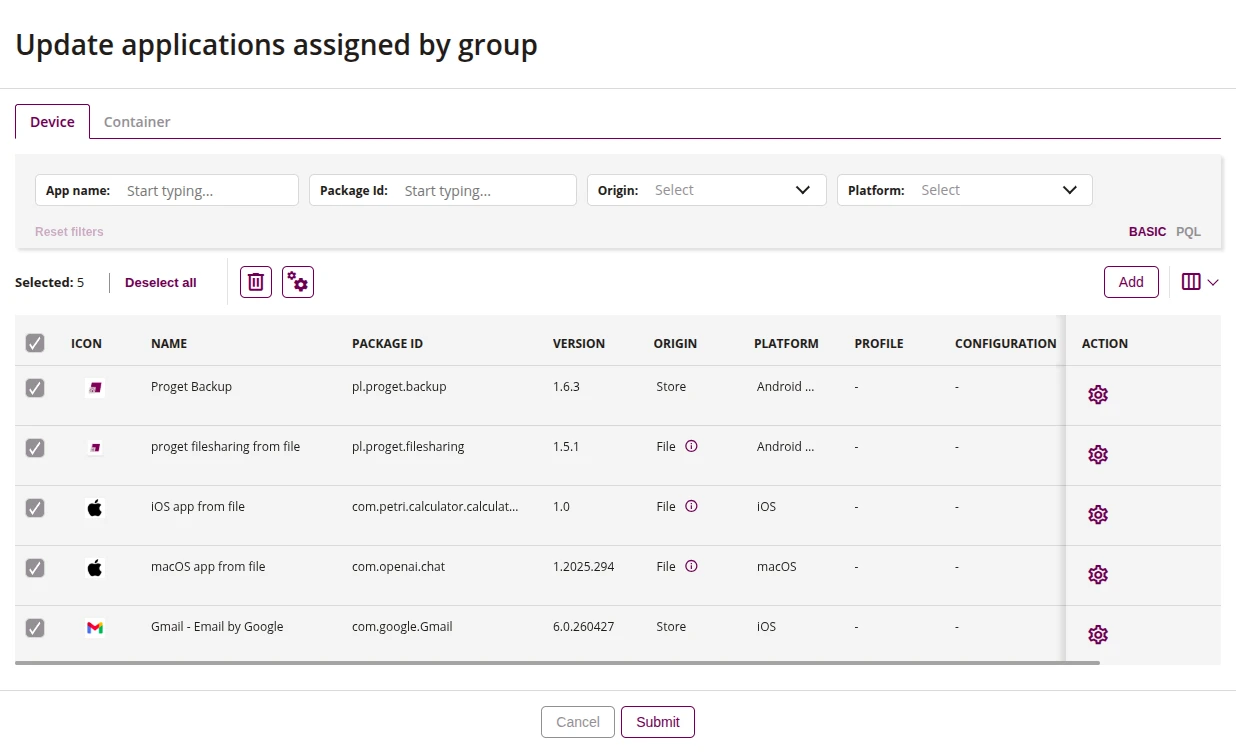
5.1 Applications Filter
- The app filter allows you to search for app which are added to the group by data, such as:
- App name
- Package Id
- Origin
- Platform
5.2 Delete
- This action allows you to remove selected applications from the group
5.3 Global settings for selected applications
- The application settings window allows you to configure platform-specific parameters:
- Android
- Automatic installation mode (apps from the store)
- One-time installation - the app is installed once; if uninstalled by the user, it will not be reinstalled
- Force installation - the app is installed automatically; if uninstalled, it will be reinstalled
- Do not install - the app is not installed on the device
- Automatic installation mode (apps from files or external resources)
- Force installation - the app is installed automatically; if uninstalled, it will be reinstalled
- Do not install - the app is not installed on the device
- Automatic update mode
- Default update - the app updates according to default settings
- High priority update - the app updates automatically as soon as a new version appears in Google Play
- Postponed update - the app does not update automatically despite a new version being available
- According to policy - the app updates according to the policy assigned to the device
- Uninstall settings
- Uninstall not blocked - the user can uninstall the app
- Uninstall blocked - the user cannot uninstall the app
- According to policy - behavior consistent with the policy assigned to the device
- Wi-Fi connection requirements
- Wi-Fi required - the app installs/updates only over a Wi-Fi connection
- Wi-Fi not required - the app installs/updates over any connection
- According to policy - behavior consistent with the policy assigned to the device
- Installation priority
- High - an app with this priority is installed first in the queue
- Normal - the app is installed in the standard order
- Low - an app with this priority is installed last in the queue
- Install only when idle - installation occurs only when the device is not in use
- Yes
- No
- Install only while charging - installation occurs only when the device is connected to a charger
- Yes
- No
- Notify the user after assigning app configuration - displays a notification after a new configuration is assigned
- Yes
- No
- Clear app data before assigning configuration - removes existing app data before applying the new configuration
- Yes
- No
- Automatic installation mode (apps from the store)
- Apple
- Required
- Yes - the app is required on the device and is installed automatically
- No - the app is not required, the user can install it optionally
- Profile
- List of available configuration profiles to assign to the app
- None
- Management options
- None - No setting
- Remove app - If the app was installed as managed, it will be removed when the MDM profile is removed
- Prevent backup - Prevents backups of the app's data from being created
- Remove app and prevent backup - Combines both functions: removes the app when the MDM profile is removed and prevents backups
- Convert from unmanaged to managed - take control of an app previously installed by the user
- Yes
- No
- Lockable - allows the app to be locked on the device screen (Feature available from iOS 18)
- Yes
- No
- Hideable - allows the app icon to be hidden
- Yes
- No
- Feature available only when 'Lockable' is enabled
- Removable - allows the user to uninstall the app
- Yes
- No
- Screen lock for Tap to Pay - forces a screen lock after a Tap to Pay transaction
- Yes
- No
- Enable direct downloads for associated domains
- Yes
- No
- Manage associated domains
- Add
- Remove
- Associated domains (list of domains in the format applinks:example.com)
- Available if the 'Add' option is selected in 'Manage associated domains'
- Required
5.4 Add applications
- Assign applications to the group
5.5 Configure single application
- The application configuration window allows you to set platform-specific parameters:
- Android
- Automatic installation mode (apps from the store)
- Automatic installation mode (apps from files or external resources)
- Automatic update mode
- Uninstall settings
- Wi-Fi connection requirements
- Installation priority
- Install only when idle - installation occurs only when the device is not in use
- Install only while charging - installation occurs only when the device is connected to a charger
- Notify the user after assigning app configuration - displays a notification after a new configuration is assigned
- Clear app data before assigning configuration - removes existing app data before applying the new configuration
- Application version - allows you to select a specific version of the app to install on the device
- Application configuration - allows you to assign additional configuration parameters to the app (e.g. managed app configuration)
- Apple
- Required
- Application version - allows you to select a specific version of the app to install on the device
- Profile
- Application configuration - allows you to assign additional configuration parameters to the app (e.g. managed app configuration)
- Management options
- Convert from unmanaged to managed - take control of an app previously installed by the user
- Lockable - allows the app to be locked on the device screen (Feature available from iOS 18)
- Hideable - allows the app icon to be hidden
- Removable - allows the user to uninstall the app
- Screen lock for Tap to Pay - forces a screen lock after a Tap to Pay transaction
- Enable direct downloads for associated domains
- Manage associated domains
- Associated domains (list of domains in the format applinks:example.com)
6 Device list
- List of all devices added to the group, with their parameters