ActiveSync
Updated:
ActiveSync profile allows you to configure automatically an email profile on device to connect to the email server like Microsoft Exchange and data synchronization, etc. email, calendar, contacts.
Compatibility:
- iOS
- WindowsDeprecated
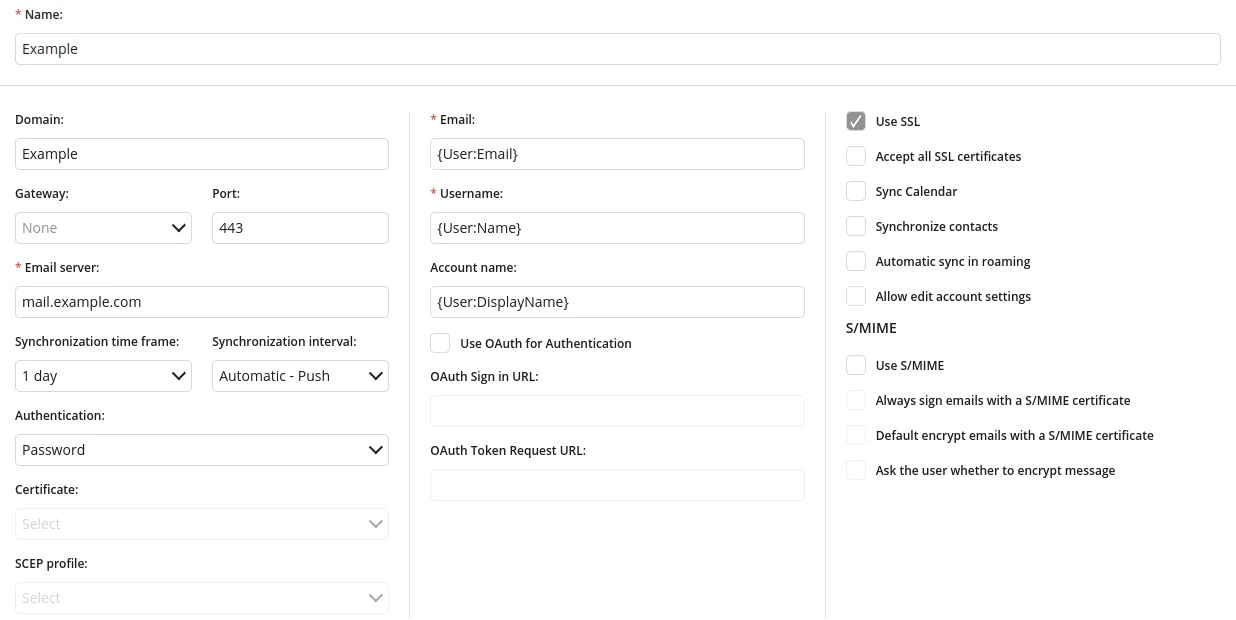
1 Name
- Enter the name of the ActiveSync profile
- Maximum length of the text is 255
- Required
2 Server Config
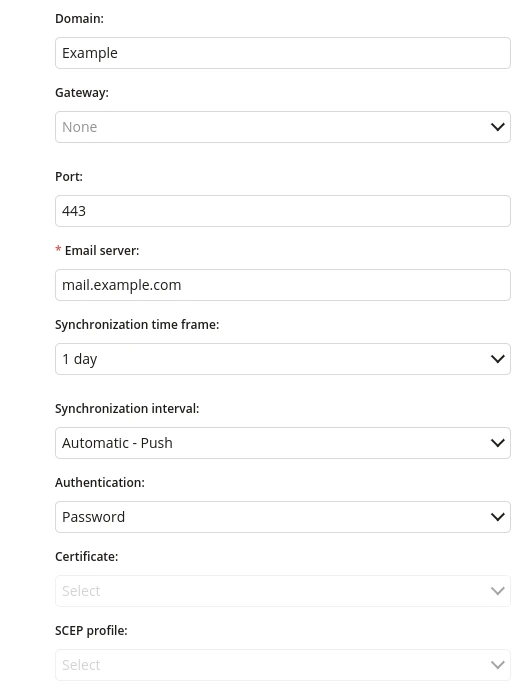
2.1 Domain
- Enter the domain name of the Exchange server
- Maximum length of the text is 32
2.2 Gateway
- Choose the gateway profile from the list, which will secure traffic between the mobile device and internal e-mail systems
2.3 Port
- Enter the protocol port by means of which the connection is made to the service (port 443 is used by default for connection using TLS / SSL)
- Maximum value is 65535
- Required
2.4 E-mail server
- Enter the name of the server on which the account was created
- Maximum length of the text is 32
- Required
2.5 Synchronization time frame
- Specifies from which period of time the data will be synchronized
- One of:
- 1 day
- Week
- 2 weeks
- Month
- All
2.6 Synchronization interval
- Specifies the frequency of data synchronization (Automatically or time period)
- One of:
- Automatic - Push
- Never
- 5 min
- 10 min
- 30 min
- 1 hour
2.7 Authentication
- Choose the password for authentication
- One of:
- Password
- Certificate
- SCEP profile
2.8 Certificate
- Choose the Certificate profile which will be used for authentication
2.9 SCEP profile
- Choose the SCEP profile which will be used for authentication
3 User Config
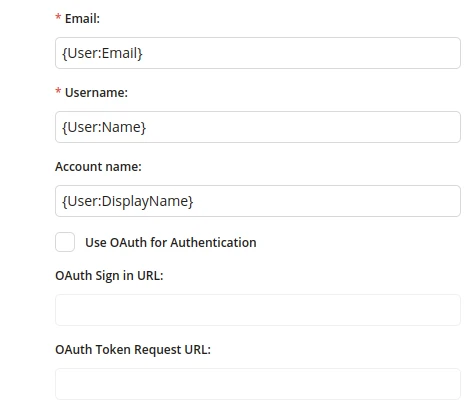
3.1 e-mail
- Enter an e-mail address for which the profile will be configured
- Global variables available
- Maximum length of the text is 255
- Required
3.2 Username
- Username that matches the name for the Exchange account
- Global variables available
- Maximum length of the text is 32
- Required
3.3 Account name
- Global variables available
- Maximum length of the text is 32
3.4 Use OAuth for Authentication
- If checked, allows user to authorize automatically
- Available only on devices with iOS 12.0 or higher
3.5 OAuth Sign in URL
- URL to the endpoint that authenticates user credentials
- Available only on devices with iOS 12.0 or higher
- Available if "Use OAuth for Authentication" is checked
- Maximum length of the text is 512
3.6 OAuth Token Request URL
- Authorization tokens to prove an identity between consumers and service providers
- Available only on devices with iOS 12.0 or higher
- Available if "Use OAuth for Authentication" is checked
- Maximum length of the text is 512
4 Security Config
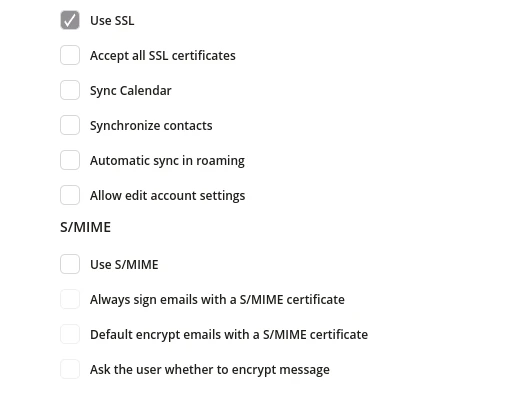
4.1 Use SSL
- If checked, using SSL when connecting is allowed. It ensure that connection is secure by SSL certificate.
4.2 Accept all SSL certificates
- If checked, all the certificates for the connection will be accepted
4.3 Sync Calendar
- If checked, calendar data will be downloaded during account synchronization
4.4 Synchronize contacts
- If checked, contacts will be downloaded during account synchronization
4.5 Automatic sync in roaming
- If checked, the Exchange account data will be automatically synchronized (with a specified interval) also using roaming data, this may result in additional costs being charged
4.6 Allow edit account settings
- If checked, changing the account settings from the application will be allowed
4.7 Use S/MIME
- If checked, mail will be encrypted with S/MIME standard
4.8 Always sign e-mails with a S/MIME certificate
- If checked, mails always will be signed with S/MIME certificate. It ensure that the message in receiver inbox is the exact message that started with the sender.
- Available if "Use S/Mime" is checked
4.9 Default encrypt e-mails with a S/MIME certificate
- If checked, mails will be encrypted with S/MIME certificate. It ensure that the message content will be only shown for persons with right key.
- Available if "Use S/Mime" is checked
4.10 Ask the user whether to encrypt message
- If checked, user has the option of choose whether the message should be encrypted
- Available if,"Use S/Mime" is checked