Android.
Android Kiosk profile allows you to limit the functionality of the device to specific applications.
Links on this page: Single app, Multi app.
Android
Updated:
Kiosk profile allows you to limit the functionality of the device to specific applications. You can use the Kiosk profile to configure the device to use only one or a few specific applications.
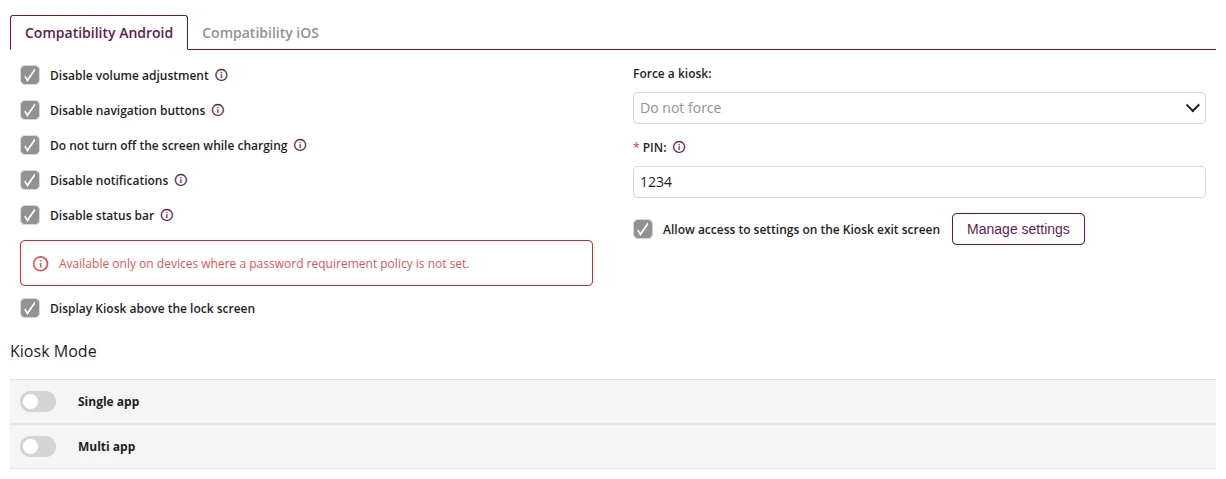
1 Configuration
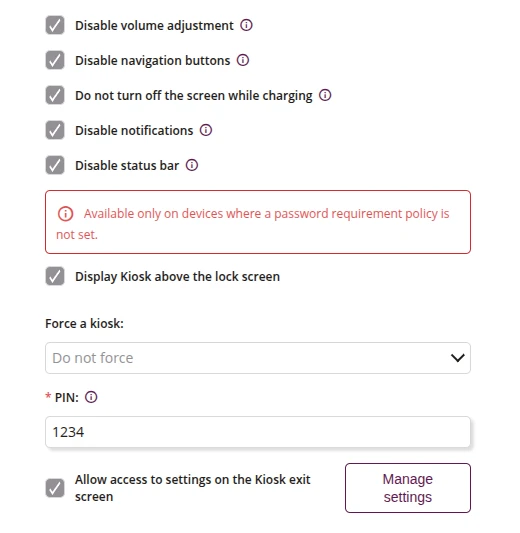
1.1 Disable volume adjustment
- If checked, the volume adjustment will be disabled while Kiosk is turned on
1.2 Disable navigation buttons
- If checked, blocks the use of the “Recent Apps”, “Home”, and “Back” buttons while Kiosk is turned on
- Available only on Android Enterprise Device Owner
1.3 Do not turn off the screen while charging
- If checked, the screen will not turn off while charging when Kiosk is turned on
1.4 Disable notifications
- If checked, disallows to use the Home button while Kiosk is turned on
- Available only on devices with Android 9.0 or higher
- Available only on Android Enterprise Device Owner
1.5 Disable status bar
- If checked, disable access to device status bar, after unchecking the device will display information such as battery status, connection to Wi-Fi network, clock
- Available only on devices with Android 9.0 or higher
- Available only on Android Enterprise Device Owner
1.6 Display Kiosk above the lock screen
- If checked, the Kiosk will be displayed above the lock screen
- By default, the Kiosk is displayed below the lock screen
- Only works when the password policy does not require a password
- Available only on Android Enterprise Device Owner
NEW
1.7 Force a kiosk
- Specifies whether or after what time the Kiosk profile will appear on the device (e.g. if the user has exited it)
- One of:
- Do not force
- 5
- 10
- 15
- 30
- 60
1.8 PIN
- Enter the PIN which will be used to exit the kiosk
- Minimum length of the PIN is 4
- Maximum length of the PIN is 16
- Required
1.9 Allow access to settings on the Kiosk exit screen
- If checked, the user will have access to the Proget settings panel (e.g. Wi-Fi, volume, brightness) on the Kiosk exit screen
- The exit screen is reached by pressing the "Back" button multiple times
- Available in 'Multi app' and 'Single app' Kiosk mode
- Available only on Android Enterprise Device Owner
NEW
1.10 Manage settings
- Configure which settings categories are available on the Kiosk exit screen
- Wi-Fi
- Show available networks
- Wi-Fi Calling
- Bluetooth
- Mobile Networks
- Screen brightness
- Volume
- If set, requires at least one category
- Available when "Allow access to settings on the Kiosk exit screen" is checked
NEW