
File Manager
BETA
The module allows you to manage files on iOS and Android devices. It requires the File Manager application to be installed and configured. The available storage space for uploaded and downloaded files is limited – once it is exceeded, further file operations will not be possible. To restore the ability to manage files, selected items must be removed from the table.
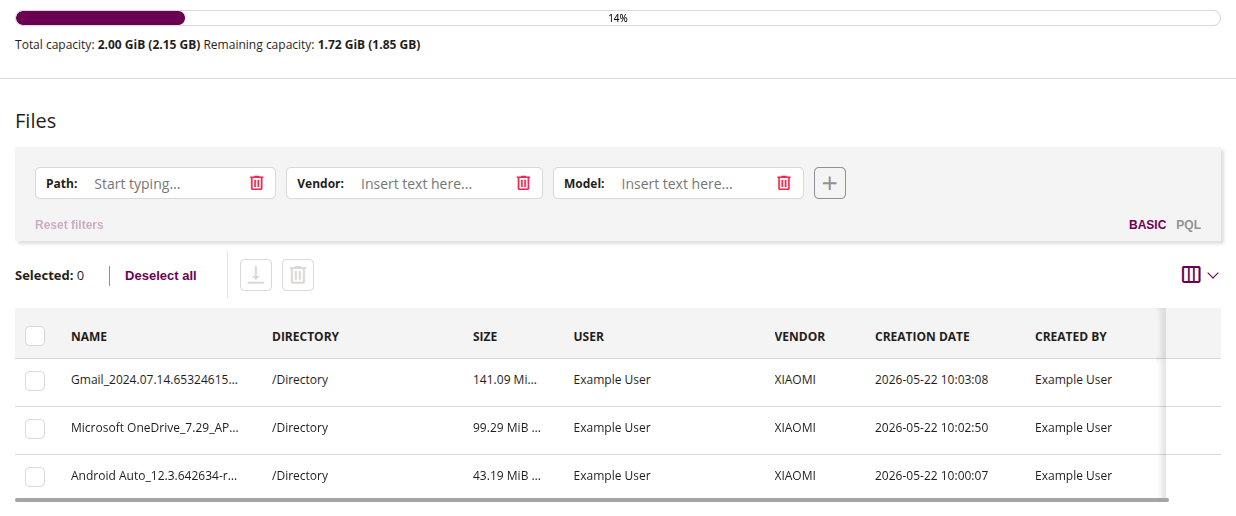
1 Disk percentage full
- Displays the current storage usage as a progress bar with the percentage of used space, total capacity and remaining capacity
2 Filters
- The file filter allows you to search for available files using basic filters such as:
- Path
- Vendor
- Model
- Use the ‘+’ button to add additional filter criteria
3 Download
- This action allows you to download the selected files from the list to your computer
- Select one or more files from the list to enable this action
4 Delete
- This action allows you to delete the selected files from the File Manager storage, freeing up disk space
- Select one or more files from the list to enable this action
5 List of uploaded files
- Displays all files uploaded from devices to the File Manager storage, including file name, directory, size, user, device vendor, creation date, and the user who created the entry