Dependency graph.
The Dependency graph tab displays an interactive visualization of relationships between key system elements such as labels, groups, users, d
Dependency graph
Updated:
NEW
The Dependency graph tab displays an interactive visualization of relationships between key system elements such as labels, groups, users, devices, roles and directory integrations (LDAP/Entra). It allows administrators to quickly understand how individual elements are interconnected, without navigating between multiple views. The feature is currently available for super admins only.
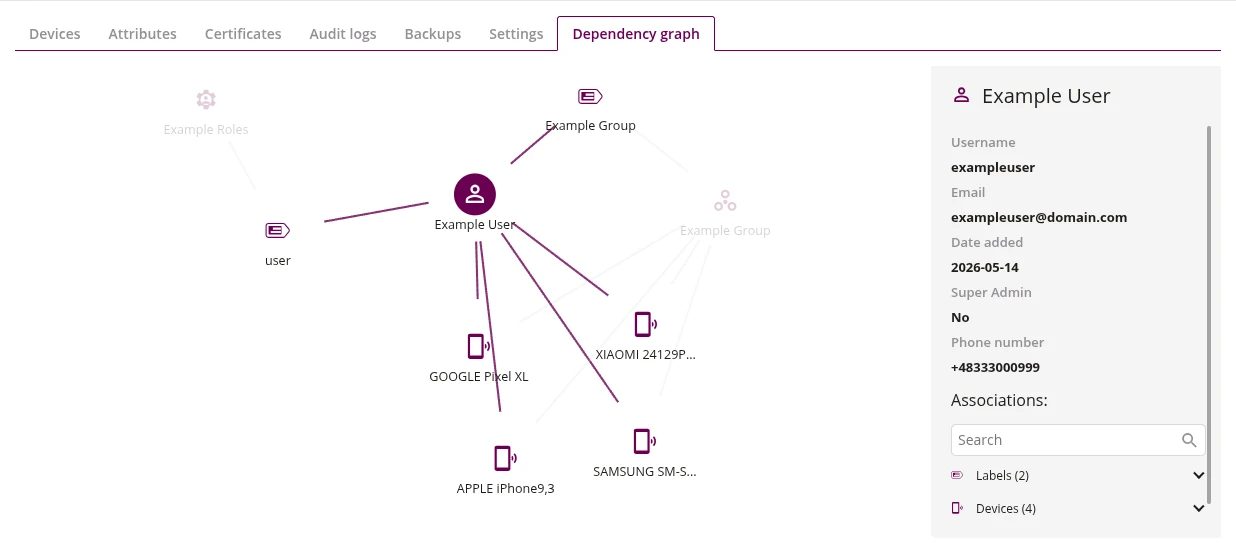
1 Graph
- Interactive graph showing the selected entity as the central node with connected elements displayed around it
- Connected elements include devices, groups, roles, labels and directory integrations
- Click on a node to view its details in the side panel
- Nodes with a number represent aggregated elements - click to expand them into individual nodes
2 Details panel
- Side panel showing detailed information about the selected element, such as username, email, date added, super admin status, and phone number
- Associations section lists related elements grouped into accordion categories (e.g. Labels, Devices, Groups, Users, Roles)
- Use the search field to filter associations
- Click on an element to navigate to its detailed view in the system