
Manage Allowed SIM Cards
The Manage Allowed SIM Cards wizard allows you to perform bulk operations on the list of allowed SIM cards (ICCID numbers). You can add new entries, remove selected ones, or remove all entries from the list. New ICCID numbers can be added from a CSV file or entered manually.

1 Add
- This action allows you to add new ICCID numbers to the allowed SIM cards list either by importing them from a CSV file or by entering them manually
2 Delete
- This action allows you to remove selected ICCID numbers from the allowed SIM cards list either by importing them from a CSV file or by entering them manually
3 Delete all
- This action allows you to remove all ICCID numbers from the allowed SIM cards list at once
4 From file

4.1 Select file
- This action allows you to select a CSV file containing the list of ICCID numbers to be added or removed
- A sample CSV file can be downloaded from the wizard
5 Manual input
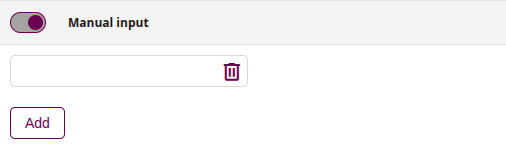
5.1 Set ICCID SIM number
- Enter the ICCID number of the SIM card to be added to or removed from the allowed SIM cards list
5.2 Add
- This action allows you to add another field for manually entering the ICCID number