
Dependency graph
NEW
The Dependency graph tab on the device card displays an interactive visualization of relationships between the selected device and other system elements such as users, groups, roles, labels, profiles, policies, and directory integrations (LDAP/Entra). It allows administrators to quickly understand what is assigned to or associated with a specific device, without navigating between multiple views.
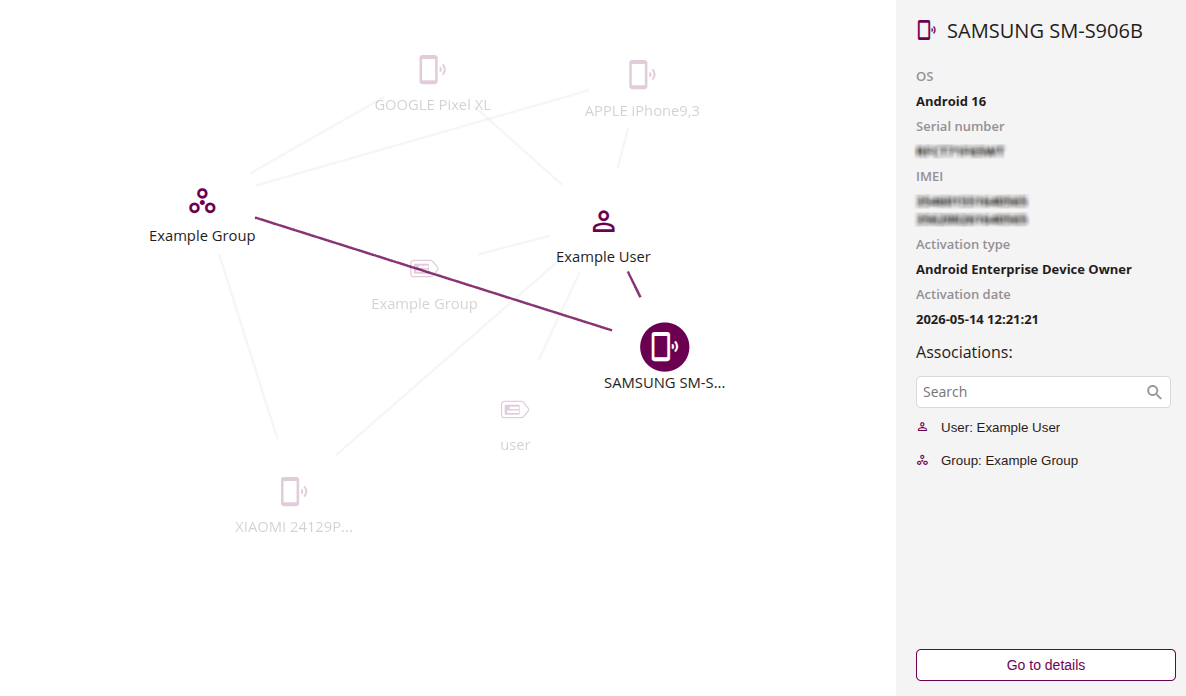
1 Graph
- Interactive graph showing the device as the central node with connected elements displayed around it
- Connected elements include users, groups, roles, labels, profiles, policies, and directory integrations assigned to or associated with the device
- Click on a node to view its details in the side panel
- Nodes with a number represent aggregated elements – click to expand them into individual nodes
2 Details panel
- Side panel showing detailed information about the selected element
- When the device node is selected, it displays device-specific data such as OS, serial number, IMEI, activation type, and activation date
- Associations section lists related elements grouped into accordion categories (e.g. Users, Groups, Roles, Labels)
- Use the search field to filter associations
- Click on an element to navigate to the detailed view in the system